Your website might look fantastic, but can Google and AI search tools actually understand it?
As AI-powered search becomes part of how customers discover businesses, there’s a lot of discussion about creating the right content, answering customer questions and getting your business mentioned by AI tools.
But there’s another important piece of the puzzle that’s often overlooked.
Your website’s technical foundations.
How your website is built, organised and maintained can influence how easily search engines discover and understand your content.
And if those foundations aren’t right, even excellent content may struggle to perform.
The good news? You don’t necessarily need a brand-new website to make improvements.
Let’s look at seven technical issues worth checking as we head into 2027.
The Key Takeaway
Your website’s structure, speed and technical foundations can affect how easily search engines discover and understand your business. Improving these foundations supports traditional SEO and helps prepare your website for AI-powered search.
In this article:
- 1. Your Website Navigation Is Confusing
- 2. Important Website Content Is Hidden Behind JavaScript
- 3. Your Website Doesn’t Have a Logical Page Structure
- 4. Your Website Has Poor Internal Linking
- 5. Your Website Is Too Slow or Difficult to Use on Mobile
- 6. Your Website Content Isn’t Clearly Organised
- 7. Your Website Has Technical SEO Issues You Don’t Know About
First, What Does Website Architecture Have to Do With AI Search?
Website architecture refers to how your website is structured and how its pages, content, navigation and technical components work together.
Think of your website like a house.
You might have beautiful interiors, but if the foundations aren’t solid or visitors can’t find their way around, the experience quickly becomes frustrating.
Websites work in much the same way.
Search engines need to discover your pages, access their content and understand how everything connects.
AI-powered search experiences, including Google AI Overviews and AI Mode, also rely on systems that retrieve and interpret information from websites.
Google has confirmed that its existing SEO best practices remain relevant for appearing in its AI-powered search experiences.
That means the fundamentals still matter:
- Clear website navigation
- Logical page structures
- Crawlable content
- Descriptive internal links
- Fast, mobile-friendly pages
- Helpful, well-organised information
Getting these foundations right won’t guarantee your business appears in an AI-generated answer, but it gives your content a better opportunity to be discovered and understood.

1. Your Website Navigation Is Confusing
Have you ever visited a website and struggled to find what you’re looking for?
Perhaps the services are hidden under several menu levels, important pages are difficult to locate, or everything has been squeezed into one enormous dropdown menu.
It’s frustrating for visitors, and it can also make it harder for search engines to discover important pages.
Why Navigation Matters for SEO and AI Search
Your website navigation helps communicate which pages are important and how different topics relate to one another.
For example, a plumbing business might organise its website like this:
Home > Plumbing Services > Hot Water Systems > Hot Water Repairs
This creates a logical pathway from a broad service category to a specific service.
Compare that with a website where every service is listed under a generic menu item called ‘What We Do’.
The first structure provides clearer context for both visitors and search engines.
What Should You Do?
Review your website navigation and ask:
- Can customers find your main services within one or two clicks?
- Does every important service have its own page?
- Are your menu labels clear and descriptive?
- Can visitors easily navigate back to related information?
Smart Robbie Tip: Keep your navigation simple. You don’t need an enormous menu to have a well-structured website.
A clear, logical structure will usually serve your visitors better than an unnecessarily complicated design.
2. Important Website Content Is Hidden Behind JavaScript
This one is a little more technical, but it’s worth understanding.
Many modern websites use JavaScript to create interactive features such as animated sections, expandable content, dynamic menus and page transitions.
There’s nothing inherently wrong with JavaScript.
In fact, it can create excellent website experiences.
The problem arises when important content depends entirely on JavaScript to appear.
Can AI Search Tools Read JavaScript?
It depends on the system.
Google can render and process JavaScript, although JavaScript-heavy websites can introduce additional crawling and indexing challenges.
Other automated systems may not execute JavaScript in the same way.
If your important service information only appears after a script runs, some systems may struggle to access it.
For example, imagine a website where all the service descriptions are loaded dynamically after someone clicks a button.
A visitor might see everything perfectly.
But a system accessing only the initial HTML could receive very little useful information.
What Should You Do?
Where practical, ensure your important website content is available in the page’s HTML rather than relying entirely on JavaScript.
This includes:
- Main service descriptions
- Important headings
- Business information
- Internal navigation links
- Frequently asked questions
Smart Robbie Tip: You don’t need to remove interactive features from your website. The goal is to make sure the important information remains accessible.
A good web developer can test whether your content is available to search engines and identify potential rendering issues.
3. Your Website Doesn’t Have a Logical Page Structure
A common mistake we see on small business websites is trying to squeeze too much information onto one page.
For example, a business might offer six different services but only have one general Services page.
While this might look neat from a design perspective, it can limit the amount of relevant information available for each service.
Why Dedicated Service Pages Matter
Imagine someone searches for:
‘WordPress website maintenance Sydney’
A dedicated page explaining WordPress maintenance is likely to provide a more focused answer than a general website design page containing just one paragraph about maintenance.
The same principle applies when AI-powered search systems retrieve information to answer specific questions.
Well-organised pages make it easier to identify content relevant to a particular topic.
What Should You Do?
Consider whether your main services deserve their own pages.
Each important service page should clearly explain:
- What the service is
- Who it’s suitable for
- What problems it solves
- What’s included
- Why someone should choose your business
- How to enquire or get started
Avoid creating dozens of near-identical pages simply to target different keywords.
The goal is to build genuinely useful pages around distinct services and customer needs.
Smart Robbie Tip: We recommend planning your website structure and SEO strategy before beginning the visual design.
That way, your website isn’t just designed to look good. It’s built around how customers actually search for your services.
4. Your Website Has Poor Internal Linking
Internal links are links that connect pages within your own website.
They’re one of the simplest SEO improvements a business can make, yet they’re frequently overlooked.
Why Internal Links Are Important
Internal links help visitors discover related information.
They also help search engines find pages and understand relationships between different topics.
For example, if someone is reading an article about website security, it makes sense to link to your WordPress maintenance service.
Likewise, a blog about website architecture might naturally link to your website design and technical SEO services.
These connections help build a clearer picture of what your business offers.
What Should You Do?
Review your website and look for opportunities to connect related content.
A few simple improvements include:
- Linking blog articles to relevant service pages
- Connecting related services
- Adding links from broader topic pages to detailed guides
- Using descriptive link text
- Making sure important pages aren’t isolated
Instead of using generic text such as ‘click here’, use descriptive wording such as ‘explore our WordPress website maintenance services‘.
Smart Robbie Tip: Internal linking should feel natural. Every link should help your visitor find something useful.
Not Sure How Your Website Is Structured?
You don’t need to understand all the technical details. We can help you identify potential website issues and recommend practical improvements.
5. Your Website Is Too Slow or Difficult to Use on Mobile
Website performance has been an important part of SEO for years.
And the rise of AI search hasn’t changed that.
Even if someone discovers your business through an AI-generated recommendation, they still need a good experience when they visit your website.
If your site takes too long to load, has confusing navigation or is difficult to use on a phone, potential customers may leave before making an enquiry.
Common Website Performance Problems
Some of the most common issues include:
- Oversized images
- Too many unnecessary plugins
- Poor-quality hosting
- Excessive scripts and animations
- Unoptimised website themes
- Layouts that don’t work properly on mobile devices
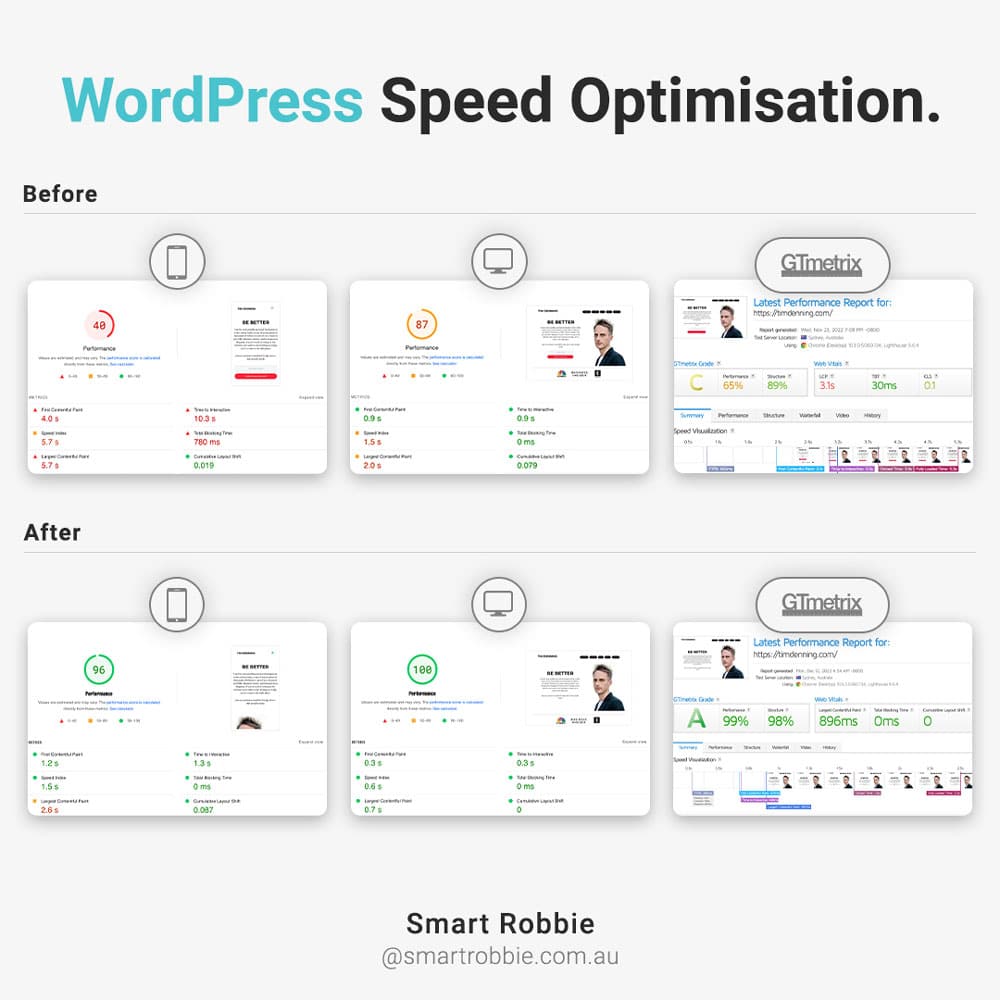
Google uses Core Web Vitals to measure important aspects of website experience, including loading performance, responsiveness and visual stability.
These are useful metrics to monitor alongside the overall usability of your website.
What Should You Do?
Start with a performance review.
Look at how quickly your website loads on mobile, whether important content appears promptly and whether visitors can easily complete key actions.
You can use Google’s PageSpeed Insights to identify potential performance improvements.
Smart Robbie Tip: A fast website isn’t just about achieving a perfect performance score.
It’s about giving visitors a smooth, reliable experience that helps turn website traffic into enquiries.
6. Your Website Content Isn’t Clearly Organised
Have you ever landed on a page with enormous blocks of text, no clear headings and very little explanation of what the business actually does?
It’s hard work to read.
Clear content structure helps people scan a page, understand the information and find answers quickly.
It also gives search engines useful context about the topics covered.
Why Headings Matter
Headings create a logical hierarchy within your content.
For example:
- H1: WordPress Website Maintenance
- H2: What’s Included in Our Maintenance Plans?
- H3: WordPress Core and Plugin Updates
- H3: Website Backups and Security Monitoring
- H2: Why Is WordPress Maintenance Important?
- H2: Frequently Asked Questions
This structure makes it easier to understand the main topic and the supporting information.
What Should You Do?
Review your most important website pages.
Make sure they include:
- One clear primary heading
- Descriptive section headings
- Short, readable paragraphs
- Useful explanations of your services
- Answers to common customer questions
- Clear calls to action
You should also ensure important information is available as actual text rather than being embedded entirely within images.
Smart Robbie Tip: Write for your customers first.
You don’t need to stuff keywords into every heading or create hundreds of FAQs for AI search.
Clear, helpful content is far more valuable than content written purely for algorithms.
7. Your Website Has Technical SEO Issues You Don’t Know About
Sometimes the biggest problems are the ones you can’t see.
A website might look completely normal to visitors while having technical issues that affect how search engines access its content.
These problems can develop over time as websites are updated, redesigned or moved between hosting providers.
Common Technical SEO Problems
Some issues worth checking include:
- Broken internal links
Links that lead to missing pages create a frustrating experience and can interrupt navigation pathways. - Incorrect redirects
Poorly managed redirects can send visitors and search engines to irrelevant pages or create unnecessary redirect chains. - Pages accidentally blocked from indexing
Important pages may contain incorrect noindex settings or other restrictions. - Duplicate content
Multiple URLs containing substantially the same content can make website management and indexing more complicated. - Missing or incorrect canonical tags
Canonical tags help indicate which URL is preferred when similar or duplicate pages exist. - Outdated XML sitemaps
Your sitemap should accurately reflect the important, indexable pages on your website.
What Should You Do?
A technical SEO audit can help identify issues that aren’t immediately obvious.
At Smart Robbie, we look beyond how a website appears on screen.
We consider its structure, performance, technical setup and how easily search engines can access important information.
Because sometimes the improvements that make the biggest difference happen behind the scenes.
Do You Need a New Website to Improve AI Search Visibility?
Not necessarily.
This is one of the most important things for small business owners to understand.
If your existing website has a solid foundation, many improvements can be made without starting again.
For example, you might benefit from:
- Restructuring your navigation
- Improving internal links
- Creating dedicated service pages
- Fixing technical SEO issues
- Optimising website performance
- Updating outdated content
However, if your website has significant structural problems, outdated technology or limitations that make improvements difficult, a rebuild may be the more practical long-term option.
The important thing is to understand what’s working and what isn’t before making that decision.
At Smart Robbie, we believe in recommending improvements that make sense for your business, rather than suggesting a new website when your existing one can be improved.
How Can You Check Whether Your Website Is Ready for AI Search?
You don’t need to be a developer to spot some of the warning signs.
Start by asking yourself these seven questions:
- Can customers easily find my main services?
- Does each important service have a clear, dedicated page?
- Can search engines access the important content on my website?
- Do my pages link naturally to related information?
- Does my website load quickly and work well on mobile?
- Is my content organised with clear headings and useful information?
- Has my website had a technical SEO review recently?
If you’re unsure about several of these questions, it may be worth having your website reviewed.
Remember, being technically accessible is only part of AI search visibility.
Your website also needs genuinely useful content, clear information about your business and signals that help establish its credibility.
For a broader look at preparing your content, read our guide:
Is Your Website Ready for AI Search? A Practical Checklist for 2027.
Frequently Asked Questions About Website Architecture and AI Search
Website architecture can influence how easily search engines discover, crawl and understand your content. Clear navigation, logical page structures and internal linking support traditional SEO and can also help make content accessible to AI-powered search systems. However, good architecture alone doesn’t guarantee visibility in AI-generated answers.
Yes. WordPress websites can be discovered and accessed by search engines and AI-related crawlers, provided the relevant pages are publicly accessible and the systems are permitted to crawl them. Technical issues, blocked content or JavaScript-dependent features may limit what some systems can access.
Not necessarily. Many websites can be improved through technical SEO, better navigation, clearer content structures and performance optimisation. A rebuild may be worthwhile if the existing website has significant technical limitations or an outdated structure.
Start with strong SEO foundations. Make sure your important pages are crawlable, your services are clearly explained, your website works well on mobile and your content answers genuine customer questions. Use descriptive headings, logical internal links and accurate business information throughout your website.
Building Websites the Smarter Way
At Smart Robbie, we’ve always believed that a successful website needs more than a great design.
It needs the right foundations.
That means considering website structure, user experience, technical SEO and performance from the beginning, rather than treating them as optional extras.
As search continues to evolve, those foundations are becoming even more valuable.
We’re a Northern Beaches-based WordPress agency helping Australian small businesses build, maintain and improve their websites.
Whether you’re planning a new website or wondering if your existing one is performing as well as it should, we can help you understand your options.
Is Your Website Helping or Holding Back Your Online Visibility?
If you’re unsure whether your website is technically ready for traditional and AI-powered search, we’d be happy to take a look.
We can help identify potential improvements to your website’s structure, performance and SEO foundations.
Good websites don’t just look great. They’re built the smarter way.
— Robyn Smart
Founder, Smart Robbie